
1.5 KiB
DeepDive into Liquid: Part II - Asset Creation and Configuration
This is a multipart DeepDive that will focus on the Liquid Sidechain. It will be released in 3 Parts:
- Part I: Overview, Installation, and first Peg-In
- Part II (this): Asset Creation and Configuration
- Part III: Advanced Topics and Peg-out
Assets
In Part I, we succesfully Pegged-In our BTC and received L-BTC, now lets use that L-BTC to do some interesting things with Asset Issuance:
-
Let's begin by checking out these 2 commands1:
$ sudo ./scripts/app compose elements exec node elements-cli -rpcuser=$E_RPCUSER -rpcpassword=$E_RPCPASS getwalletinfo
"balance": {"bitcoin": 0.00149155}
$ sudo ./scripts/app compose elements exec node elements-cli -rpcuser=$E_RPCUSER -rpcpassword=$E_RPCPASS dumpassetlabels
{"bitcoin": "6f0279e9ed041c3d710a9f57d0c02928416460c4b722ae3457a11eec381c526d"}
This is telling us that bitcoin is a label for an asset that has the UUID of 6f0279e9ed041c3d710a9f57d0c02928416460c4b722ae3457a11eec381c526d. Everything in Liquid is an 'Asset' (including L-BTC) and each of these Assets can have different features, issuance, and restrictions.
Looking up this value on https://blockstream.info/liquid/assets we see:
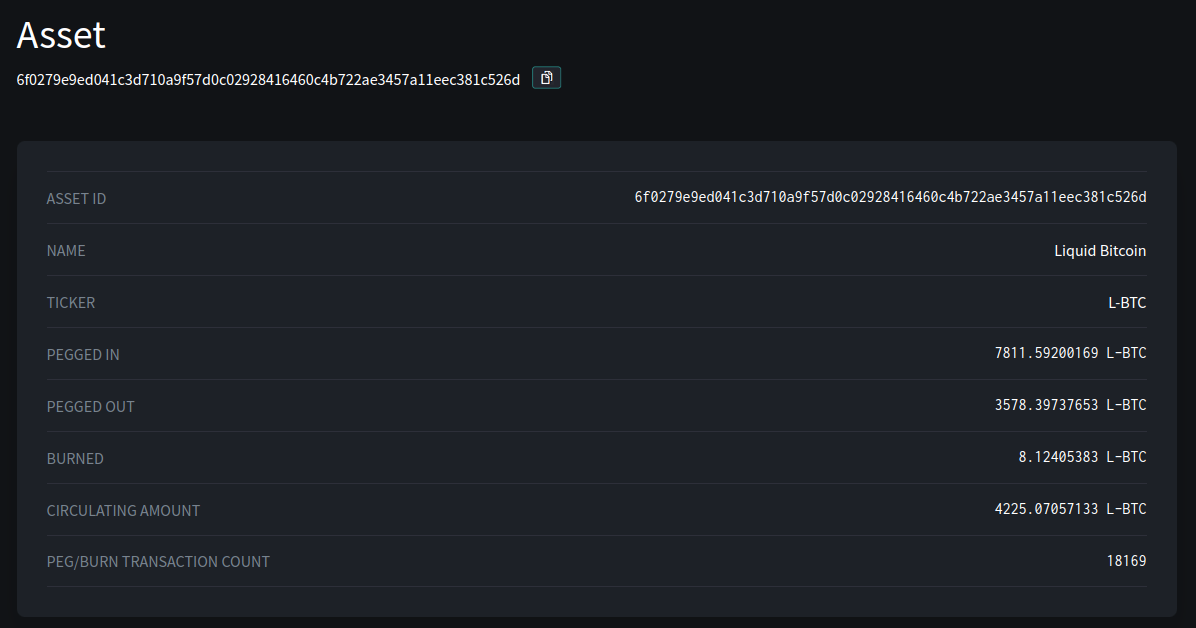
This tells us its ticker, its name, and the total circulating supply.
-
The values E_RPCUSER and E_RPCPASS, where environmental variables we set in Part I ↩︎