
9.6 KiB
DeepDive into Liquid: Part II - Asset Creation and Configuration
This is a multipart DeepDive that will focus on the Liquid Sidechain. It will be released in 3 Parts:
- Part I: Overview, Installation, and first Peg-In
- Part II (this): Asset Creation and Configuration
- Part III: Advanced Topics and Peg-out
Assets
In Part I, we successfully Pegged-In our BTC and received L-BTC, now lets use that L-BTC to do some interesting things with Asset Issuance:
Before we jump straight into creating an asset, let us first look at the assets we already have inside our pegged-in wallet1:
$ sudo ./scripts/app compose elements exec node elements-cli -rpcuser=$E_RPCUSER -rpcpassword=$E_RPCPASS getwalletinfo

"balance": {"bitcoin": 0.00149155}`

$ sudo ./scripts/app compose elements exec node elements-cli -rpcuser=$E_RPCUSER -rpcpassword=$E_RPCPASS dumpassetlabels`

{"bitcoin": "6f0279e9ed041c3d710a9f57d0c02928416460c4b722ae3457a11eec381c526d"}
So our wallet already has an asset called 'bitcoin' and there is an associated UUID of 6f0279e9ed041c3d710a9f57d0c02928416460c4b722ae3457a11eec381c526d. Everything in Liquid is an 'Asset' (including L-BTC) and each of these Assets can have different features.
Looking up this value on https://blockstream.info/liquid/assets we can see some info about it:
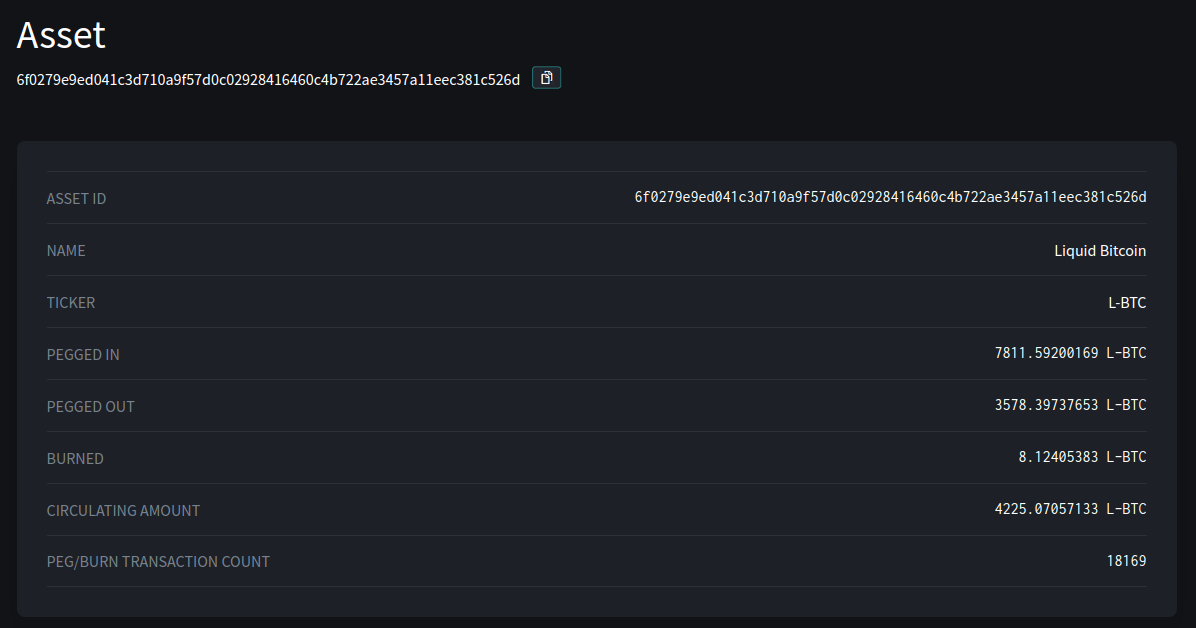
This shows us the total amount of L-BTC in circulation, additionally we can see how much was Pegged-In, Out, and Burned. Most notably, this confirms that everything is in balance. The Circulating Supply = (PEG_IN - PEG_OUT - BURNED), so no debasement has happened.
Issuing our own Asset
Issuing assets is pretty straight forward
$ sudo ./scripts/app compose elements exec node elements-cli -rpcuser=$E_RPCUSER -rpcpassword=$E_RPCPASS issueasset 10 0 true

{
  "txid": "8a12dd64c43de200cc7addb6c59f67bdbc6481ef1cc8b24253c7c1daba3c4e06",
  "vin": 0,
  "entropy": "3b8ded63f872d53d93b40ea415f3473b50c033a8e9abc1f0e7418e7f16e98dec",
  "asset": "8aa889f0bd16bab7d236ab6f3583481382bf976433360ff240cf22b79181a50f",
  "token": "2eb4da7c84a7b4db2944ead6b05041a5d8d8f4a73cd1413b140b44c4ec42fbdf"
}
Exploring our new Asset
Checking out our wallet we see:
$ sudo ./scripts/app compose elements exec node elements-cli -rpcuser=$E_RPCUSER -rpcpassword=$E_RPCPASS getwalletinfo

"balance": {"8aa889f0bd16bab7d236ab6f3583481382bf976433360ff240cf22b79181a50f": 10.00000000,
"bitcoin": 0.00140447,}
- We can see our wallet has 10 of our assets2, lets checkout what the Liquid network knows about it:
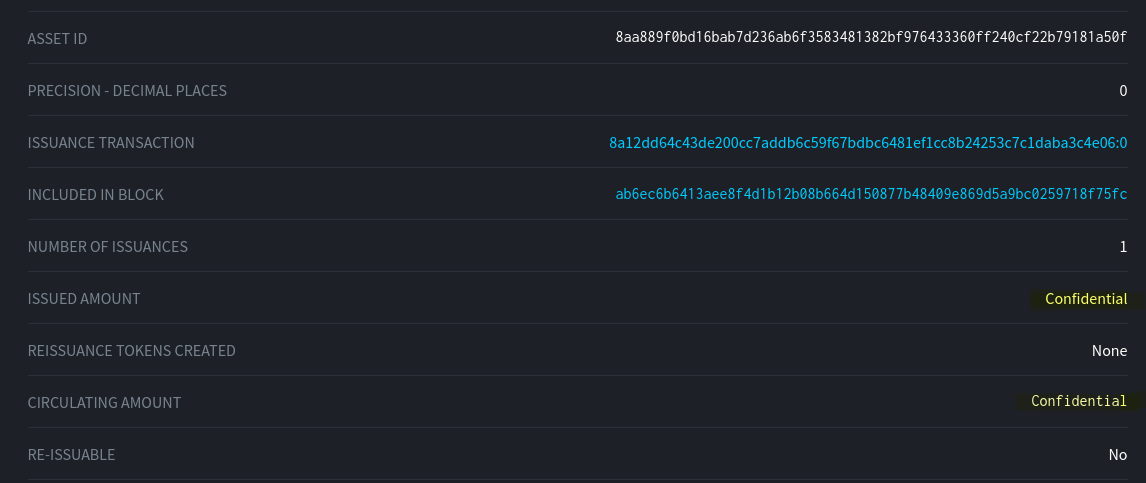
- So publicly we know the following about our new asset:
- It cannot be re-issued (fixed supply token)
- It has only been issued once
- However both the issued amount and the circulating supply has been hidden from us.
It's nice to have hidden assets, but practically speaking they might not be useful in lots of situations. For instance, suppose that we wanted users to be able to verify the circulating amounts (i.e. to prevent debasement).
It is possible to 'unblind' this information to clients, but that would involve distributing an unblinding key to each client. Luckily there is a simple solution: we can simply issue the asset as unblinded - which will permit this information to be publicly available without affecting the security of the actual transactions:
Issuing a Non-Confidential Asset
- Let's create another address3 and another asset and this time choose a different option (specifically, lets create this asset unblinded by setting the last value to false. This option controls blinded / unblinded behavior):
$ sudo ./scripts/app compose elements exec node elements-cli -rpcuser=$E_RPCUSER -rpcpassword=$E_RPCPASS issueasset 10 0 false

{
  "txid": "225f3ed16457467673fd64f3577031b91be370615b3feba53e1cc0b256768944",
  "vin": 0,
  "entropy": "fc4b02ee3892faaef2ddb673d437910ca75ca4d4e5ff4c1cb6ef1e3a4667a942",
  "asset": "41c19a473c71298a28342ccbf6fcbd3042cae8607b3b79d336b4c02e89ba2c66",
  "token": "10178003de4d2141fc318e3a61a7c8e1d43d3842a87fb8fb18fc1c1b09d081cb"
}
...and checking again what the Liquid network knows about it
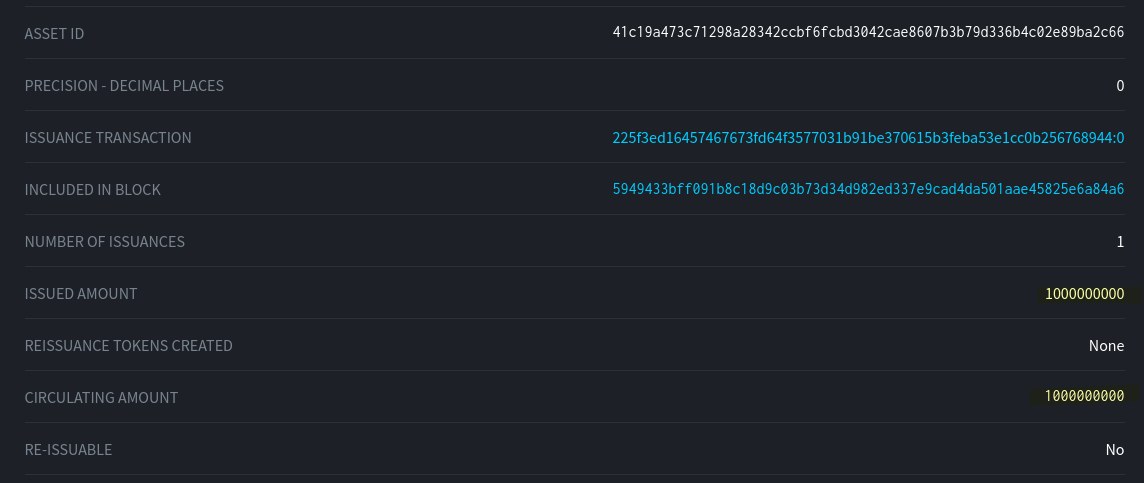
-
Now we can see the total issued amount / supply2
-
Let's try sending 2 of these unblinded assets to another wallet (my Blockstream Green mobile wallet) and see what is visible on the network.
$ sudo ./scripts/app compose elements exec node elements-cli -named -rpcuser=$E_RPCUSER -rpcpassword=$E_RPCPASS sendtoaddress address="VJLKDWB..." amount=2.0 assetlabel="41c19a..."`
b1d0592319fc5a6ed4e2ea912ddbc9e630e0a13a083a178f69054129ef589d25
- Looking up this transaction on the block explorer, we see:
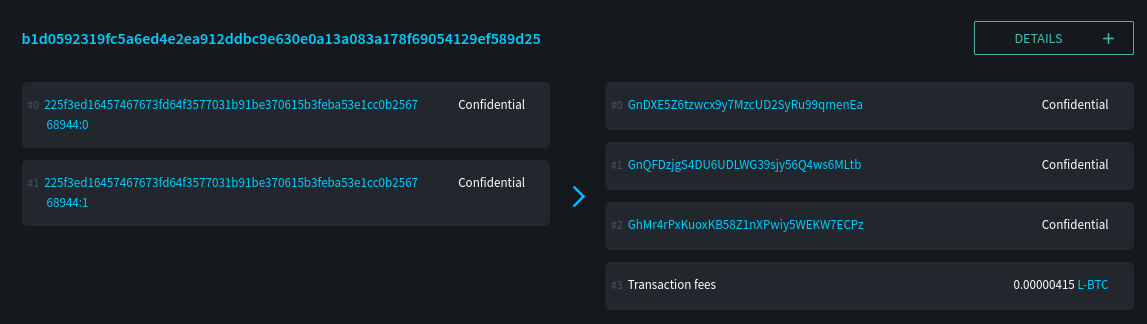
This is interesting: So although the transaction is visible, we can't see what was actually transferred (even though the details of the asset are visible, it is still hidden inside the transaction). Further, where is my Green Wallet address (ie. VJLKDWB...)? We can see 3 output addresses, presumably these are: Change, Fee, and Recipient...but where the actual Green Wallet address?
- Let's look up my Green Wallet address directly in the explorer:

So now this shows us that the Confidential Address: VJLKDWB... corresponds to the Unconfidential Address: GnDXE5... Through the magic of one-way hashes, if we know the "Confidential" address we can then derive its public address. However, just by looking at the public blockchain, there is no way to reverse that hash.
Now, lets look at how things look on the Green mobile wallet:
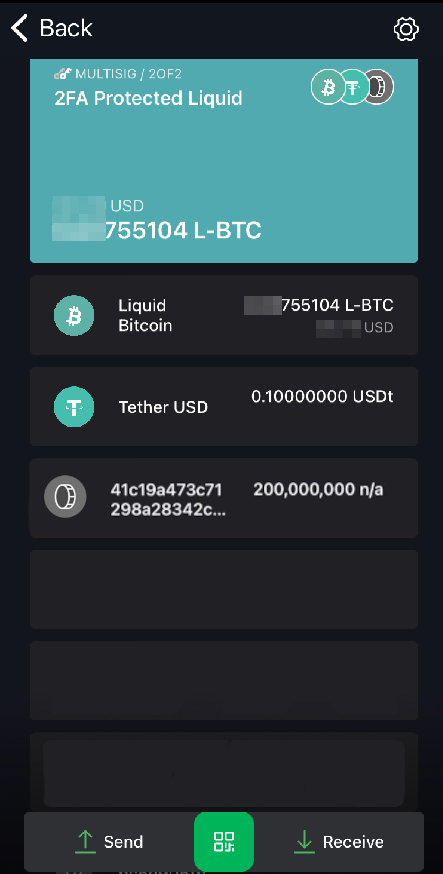
We can see that we've received 200,000,000 'sats' of our custom asset. However, notice how there is no label. Whereas, for L-BTC and Tether it shows complete with name and ticker symbol. Showing just the contract address is not very user friendly. Let's see if we can remedy.
Registering our Asset
The publication of asset metadata info on Liquid works on a .well-known system where specific files are published on a webserver that you control. There are a few different steps to accomplish this:
- Create a new legacy address4, get public key for that address.
- Generate a Contract and Contract Hash using the information we want to appear in the public registry.
- Create our asset with Contract Hash embedded in it
- If we ever want to delete the asset from the registry, generate a delete script
- Generate a
liquid-asset-prooftext file and place in.well-knownlocation on domain that matches contract - Register (or unregister) the asset via Blockstream web API
Thats a lot of steps, and many are prone to error. Luckily for us there exist a bash script to basically do all of it. Download the script from Blockstream
Save that file as issue_and_prepare_register.sh and open with text editor to customize the following values.
#NOTE: SET YOUR OWN VALUES HERE, THESE ARE WHAT I USED

NAME="StackerNewsDemo-1"
TICKER="SND-1"
DOMAIN="coins.b0xxy.net"
ASSET_AMOUNT=10.0
TOKEN_AMOUNT=0
PRECISION=8
COLLECTION=""
alias e1-cli="sudo ./scripts/app compose elements exec node elements-cli -rpcuser=$E_RPCUSER -rpcpassword=$E_RPCPASS"
With these values set, you can run the script. This script will output 3 files:
- liquid-asset-proof-ASSET (put this file in .well-known location of domain you set)
- register_asset_ASSET.sh (Bash curl script to submit via Blockstream API)
- delete_asset_ASSET.sh (Bash curl script to delete asset from registry)
Take the liquid-asset-proof-ASSET file and place it in .well-known folder in root of domain (or sub-domain in this case). Verify that you can actually reach it before proceeding to the next step.
Then you can run the register_asset_ASSET.sh script and you should get a json response back indicating success.
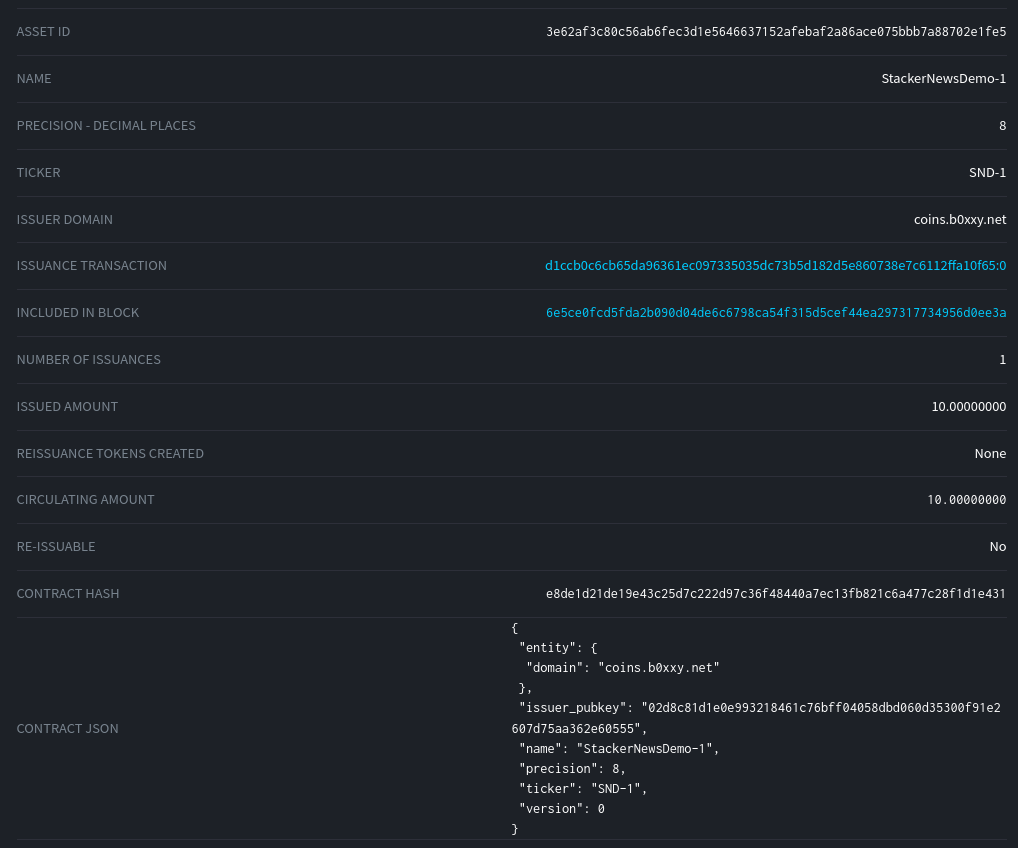
Having done the above, we can now see the asset:
- Has an actual Name + Ticker instead of just a UUID
- Has decimalization preference set
- Shows registered website that controls it
- Has a Contract + Contract Hash associated with it
Now if I send 2 of these to my same Blockstream Green Wallet:
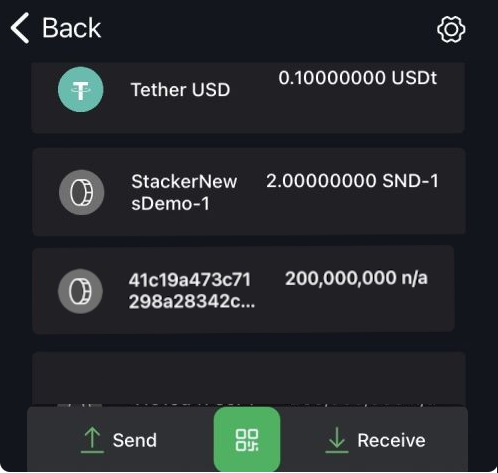
Now it shows up in a much more user-friendly format.
-
The values E_RPCUSER and E_RPCPASS, where environmental variables we set in Part I ↩︎
-
Like in bitcoin, 1 integer unit is 100,000,000 base units (not sats, but equivalent concept) - So in this case issuing "10" assets is really issuing 1000000000 units (10 x 100,000,000). ↩︎
-
So each asset is held in a separate address ↩︎
-
Using a legacy address for this task imposes no real implications to your security since its only used to remove assets from the registry. Its possible to do this with a non-legacy address, but more steps are involved and we will need to use other tools rather than what's already built-in to Elements node, so we will just use a legacy address for this. ↩︎