
7.8 KiB
Liquid DeepDive - Part I
This is a multipart DeepDive that will focus on the Liquid Sidechain. It will be released in 3 Parts:
- Part I (this): Overview, Installation, and first Peg-In
- Part II: Asset Creation and Configuration
- Part III: Advanced Topics and Peg-out
Overview
Liquid is a federated BTC sidechain. The federation which controls the network are known as 'Functionaries'. Currently, there are 15 such Functionaries1 who are geographically dispered to help isolate the network from both physical and regulatory disruption.
Block signing happens in a round-robin style arrangement - consensus requires 11-of-15 to be available.
A unique aspect of this federation is that functioinary membership is dynamic - using a protocol known as DynaFed - this allows members to be rotated out/in depending on circumstance. The signing method the functionaries use is known as ROAST (Robust Asynchronous Schnorr Threshold Signatures). As stated:
"It guarantees that a quorum of honest signers, e.g., the Liquid functionaries,
can always obtain a valid signature even in the presence of disruptive signers
when network connections have arbitrarily high latency. Our empirical performance
evaluation shows that ROAST scales well to large signer groups, e.g., a 67-of-100
setup with the coordinator and signers on different continents. Even with 33 malicious
signers that try to block signing attempts (e.g. by sending invalid responses or by not
responding at all), the 67 honest signers can successfully produce a signature within
a few seconds."
The main benefit of ROAST is that signing becomes less problematic with a large number of federation members. Obviously this along with the inclusion of DynaFed (a recent addition to the network), seems to indicate that they plan to increase the total federation functionaries in the future.
Functionaries Sign, not Mine
A key aspect of Liquid is there is no mining. The core asset, L-BTC, is only created when BTC pegs-into the network, so unlike Bitcoin, mining is not used to create issuance of new coins. The total amount L-BTC can be verified along with the equivalent amount of BTC, which are held in a public multisig address. This ensures that there is no inflation possible of L-BTC, since it is issued 1:1 with the pegged BTC.
By default, all Liquid transactions use ^^Confidential Transactions^^, so both the type of assets and amounts transacted are hidden, even to functionaries. However, Functionaries can still see the from / to addresses involved - they only don't know what is being transferred.
Liquid Ecosystem and Roles
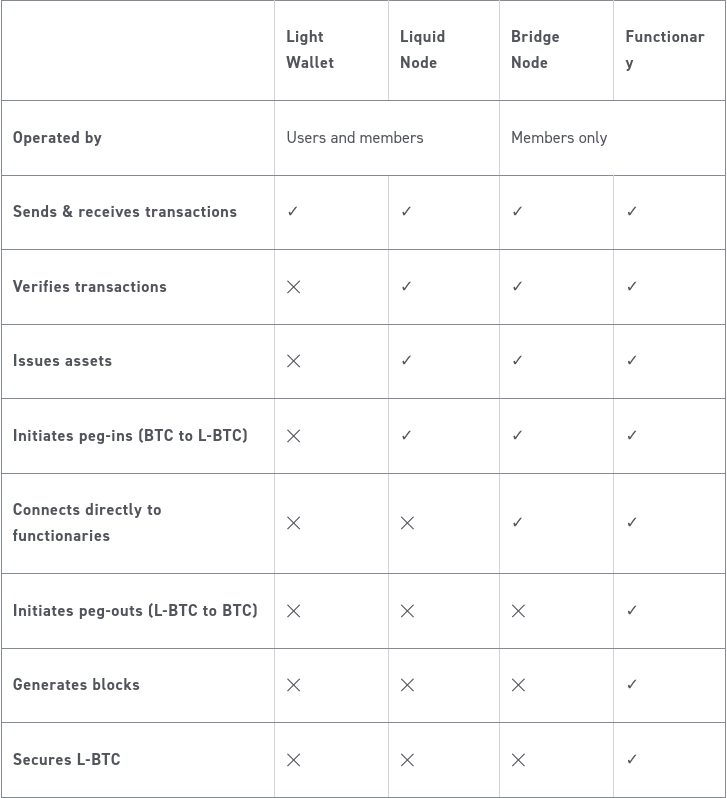
Here are some charts showing current ecosystem members and the roles various members can fulfill. In total there are currently 66 Liquid Members (not all Members are Functionaries).
Assets
Liquid supports Asset Issuance. Any full-node can issue their own Assets (only requirement is to have needed L-BTC to pay for signing fees). These assets fall into the following categories / use-cases:
* Tokens (e.g. arbitrary token issue, stablecoin, etc)
* Swaps (e.g. atomic swap of Token A for Token B)
* Options / Smart Contracts / Covenants (e.g. swap Token A for B if condition ABC is met)
* Securities (e.g. issue dividends to Token A holders after X time)
* Restricted Assets (e.g. prohibit holder of Token A from transfer without approval)
Additional Opcodes
At its core, Liquid is basically "BTC plus special OPCODES less Mining". In order to support the Smart Contracts and Convenants seen above, Liquid reintroduces some safe but disabled opcodes, including string concatenation (CAT), substrings, integer shifts, and several bitwise operations (see here for more).
A new DETERMINISTICRANDOM operation which produces a random number within a range from a seed.
A new CHECKSIGFROMSTACK (CSFS) operation which verifies a signature against a message on the stack, rather than the spending transaction itself.
These new opcodes have several use cases, including double-spent protection bonds, lotteries, merkle tree constructions to allow 1-of-N multisig with huge N (thousands), and probabilistic payments.
Installation of Elements Node and Peg-In
Liquid uses a variation of BTC Core program known as Elements, much of the setup and use are very similar to bitcoin. Please note that Elements requires a fully functioning bitcoind daemon is available (it is a sidechain, after all). Thus for this demonstration, I am using my Umbrel since it makes installing Bitcoin and Elements quite simple.
If you are intending to run Liquid on a bare-metal setup, please refer to this getting started guide to setup your environment. Setting up a core-bitcoin install is outside the scope of this DeepDive
Running Elements on Umbrel
- Meet requirements (1TB disk for BTC / 25GB disk for Liquid / >8GB RAM2)
- A running and fully-synced Bitcoin 'App'
- Install Elements 'App'
... Go take a several hour break while it downloads ...
- ssh into umbrel and install the elements-cli programs 3
ssh umbrel.local$ wget https://github.com/ElementsProject/elements/releases/download/elements-23.2.1/elements-23.2.1-x86_64-linux-gnu.tar.gz$ tar xf elements-23.2.1-x86_64-linux-gnu.tar.gz$ ln -s elements-23.2.1-x86_64 elements
- Navigate to Elements 'App' web interface on Umbrel and copy
rpcuserandrpcpasswordvalues
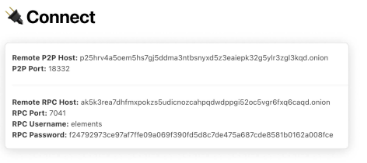
- Save the above values as bash variables for use later
$ export E_RPCUSER=elements$ export E_RPCPASS=XXXXXXXXXXXXXXXXXXXXXXX
- You should now be able to issue commands against the elements daemon
$ /elements/bin/elements-cli -rpcuser=$E_RPCUSER -rpcpassword=$E_RPCPASS getblockcount25846(It doesn’t matter what the number returned is, can even be 0, as long as no error.)
- Create a default wallet
$ /elements/bin/elements-cli -rpcuser=$E_RPCUSER -rpcpassword=$E_RPCPASS createwallet ""
- Check balance info
$ /elements/bin/elements-cli -rpcuser=$E_RPCUSER -rpcpassword=$E_RPCPASS getwalletinfo
Now let's peg-in some bitcoin in order to receive L-BTC within our Liquid wallet. (NOTE: There are online services that automate this entire process and make it much simpler. In general services like Sideswap makke this process much easier)
-
Generate a new peg-in address
-
$ /elements/bin/elements-cli -rpcuser=$E_RPCUSER -rpcpassword=$E_RPCPASS getpeginaddress{ "mainchain_address": "bc1qXXXXXXXXXXXXXXXXXXXXXXXXXXXXXXXXXXXXXXXXXXXXXXXXXXXXXXXXXX", "claim_script": "001489b0XXXXXXXXXXXXXXXXXXXXXXXXX" }
-
-
Save the
claim_scriptabove in a variable for use later$ export E_CLAIMSCR="001489b0XXXXXXXXXXXXXXXXXXXXXXXXX"
-
Send some btc to the
mainchain_addresslisted above (I'm sending 150000 sats) -
Copy the BTC transaction ID and save to variable
$ export B_TRANSID="bb1d0903XXXXXXXXXXXXXXXXXXXXXXXXXXX"
-
Wait for the BTC transaction to confirm4
Footnotes:
-
As of 1-21-2024. There are 66 members who can perform other functions on network, but only Functionaries can sign ↩︎
-
RAM usage is higher for Liquid than for BTC alone due to Confidential Transactions processing ↩︎
-
It may be possible to run the
elements-clicommand without installing it separately, however I could not find it in the container. Anyway, the download of elements node is quite small and it communicates via localport on Umbrel, so this works fine. ↩︎ -
Requires 102 confirmations on BTC side. Services like sideswap will release after 2 confs for small amounts ↩︎