
4.3 KiB
DeepDive into Liquid: Part II - Asset Creation and Configuration
This is a multipart DeepDive that will focus on the Liquid Sidechain. It will be released in 3 Parts:
- Part I: Overview, Installation, and first Peg-In
- Part II (this): Asset Creation and Configuration
- Part III: Advanced Topics and Peg-out
Assets
In Part I, we succesfully Pegged-In our BTC and received L-BTC, now lets use that L-BTC to do some interesting things with Asset Issuance:
-
Let's begin by checking out these 2 commands1:
$ sudo ./scripts/app compose elements exec node elements-cli -rpcuser=$E_RPCUSER -rpcpassword=$E_RPCPASS getwalletinfo
"balance": {"bitcoin": 0.00149155}
$ sudo ./scripts/app compose elements exec node elements-cli -rpcuser=$E_RPCUSER -rpcpassword=$E_RPCPASS dumpassetlabels
{"bitcoin": "6f0279e9ed041c3d710a9f57d0c02928416460c4b722ae3457a11eec381c526d"}
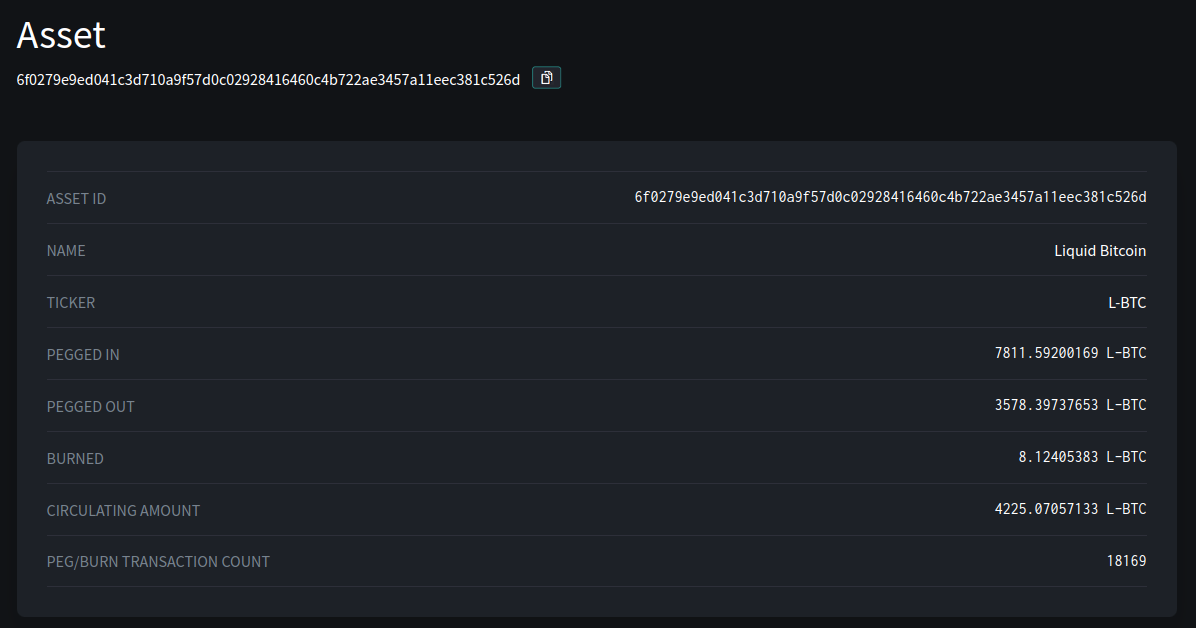
This is telling us that bitcoin is a label for an asset that has the UUID of 6f0279e9ed041c3d710a9f57d0c02928416460c4b722ae3457a11eec381c526d. Everything in Liquid is an 'Asset' (including L-BTC) and each of these Assets can have different features, issuance, and restrictions.
Looking up this value on https://blockstream.info/liquid/assets we can see info about it like its ticker, name, and circulating supply:
Issuing our own Asset
-
Issuing our own asset is straight-forward, as its a single line command in the client. Let's issue 10 new tokens and set the supply to be fixed (no re-issuance)
$ sudo ./scripts/app compose elements exec node elements-cli -rpcuser=$E_RPCUSER -rpcpassword=$E_RPCPASS issueasset 10 0 true
{ "txid": dd3983619f67e7a743ccfd32e48bbdb591c1d44b86a71d442be95a2453c0479a, "vin": 0, "entropy": cd3d7319525b28b6500d0a0b4688d91392ba8192be9bc264ec9637a001907322, "asset": 1e69f87952c26b8dfc80dda0427041a0279a0723ea12086b88b75752545e0d22, "token": 2dc5fb795fd42e08adb9dd29b5ff14f4326ecd8443e1cdc31dc6666d7576ff89 }
-
Checking out our wallet we see:
$ sudo ./scripts/app compose elements exec node elements-cli -rpcuser=$E_RPCUSER -rpcpassword=$E_RPCPASS getwalletinfo
"balance": {"1e69f87952c26b8dfc80dda0427041a0279a0723ea12086b88b75752545e0d22": 10.00000000,"bitcoin": 0.00148701}
-
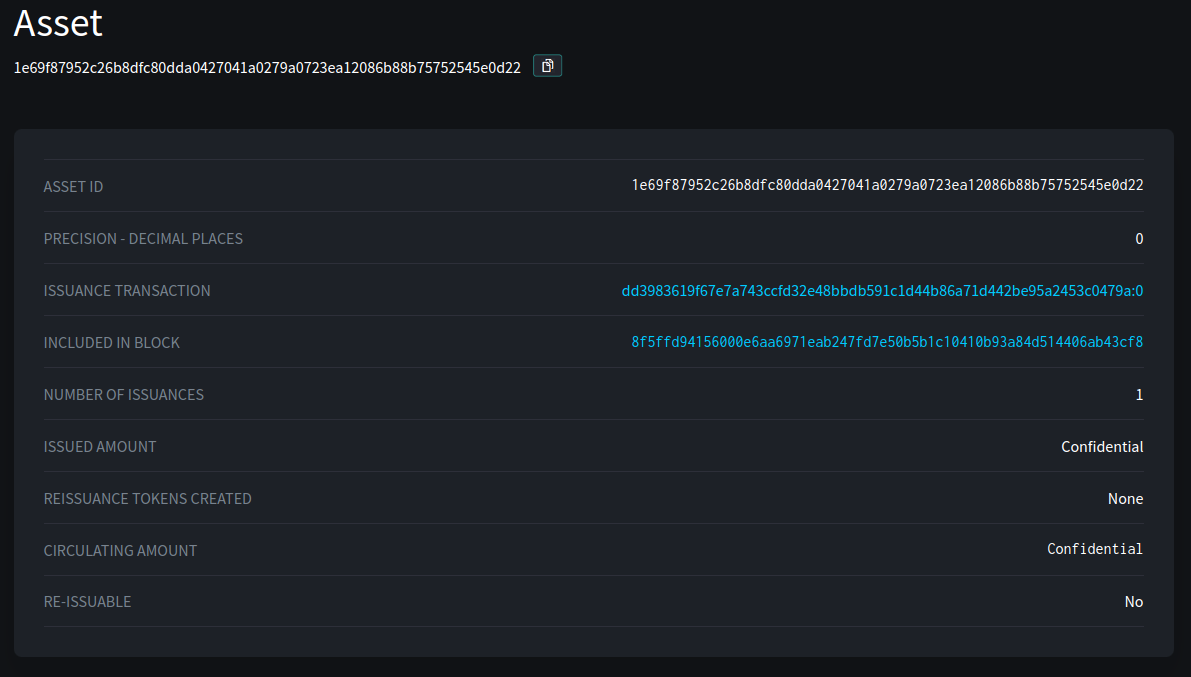
We can see our wallet has 10 of our assets2, lets checkout what the Liquid network knows about it:
-
So publiclly we know the following about our new asset:
- It cannot be re-issued
- It has only been issued once
- However both the issued amount and the circulating supply has been hidden from us.
-
Let's create another asset and this time choose a different option:
$ sudo ./scripts/app compose elements exec node elements-cli -rpcuser=$E_RPCUSER -rpcpassword=$E_RPCPASS issueasset 10 0 false
{"txid": "1dfdf2f3a393a7a7be9f1f58c8651565a29486851268027794e1b69f5227864f", "vin": 0, "entropy": "5a32df406eb3f8c4f9b59c669d411e3a5ed0fd75058c2483e5732ccc6b482722", "asset": "03d63d6c373979954a4dda2afdd941a0de96a0739da455af1cdb1a2e2a63a9a5", "token": "ac860f370aabb829b70283c05e13a327cccec8ad0eea5493980cca53dd6631f9"}
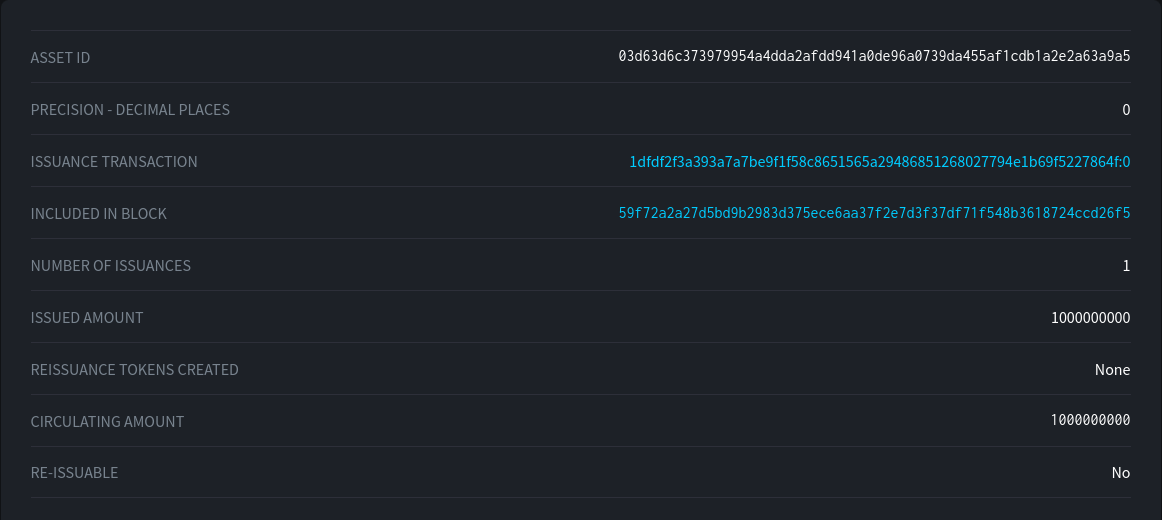
...and checking again what the Liquid network knows about it
-
Now we can see the total issued amount / supply2
-
Lets set that to a variable for use later
$ export ISSUE='{"txid": dd3983619f67e7a743ccfd32e48bbdb591c1d44b86a71d442be95a2453c0479a, "vin": 0, "entropy": cd3d7319525b28b6500d0a0b4688d91392ba8192be9bc264ec9637a001907322, "asset": 1e69f87952c26b8dfc80dda0427041a0279a0723ea12086b88b75752545e0d22, "token": 2dc5fb795fd42e08adb9dd29b5ff14f4326ecd8443e1cdc31dc6666d7576ff89 }' -
Now we can utilize individual entries (using
jqutility):$ echo $ISSUE | jq .asset
"1e69f87952c26b8dfc80dda0427041a0279a0723ea12086b88b75752545e0d22"